#Help/Advice
Your toy has been disconnected message
How to disable this message that keeps on popping up in chat box non stop. my lovense toy is disconnected and the bluetooth adapter is not in. I do not see a toggle anywhere to turn this off. The message says "Your toy has been disconnected".
Hi! That notification is controlled by the Lovense Caming Extension. To stop it from showing in the chat box, you can go to the Extension settings and look for the "Toy Status Notifications" or "Disconnect Messages" option and toggle it off. If you don't see that option in your current version, try updating the extension to the latest version — it should be available there. Hope that helps! 😊
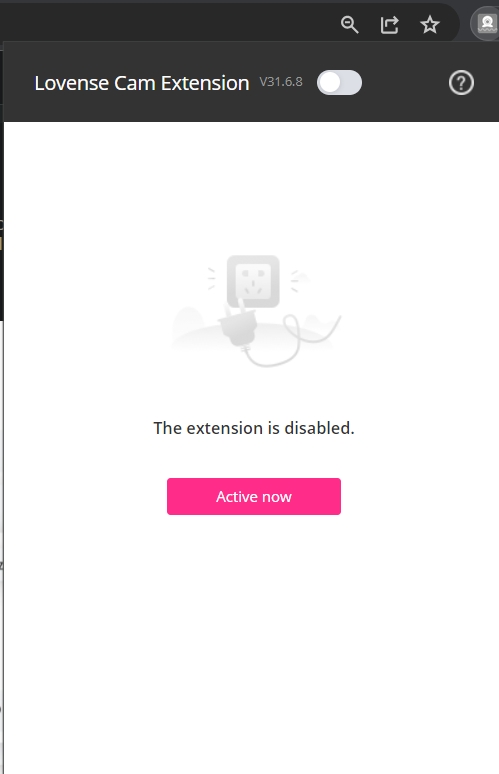
To access the Lovense Caming Extension settings, click the extension icon in your browser's toolbar (top-right area), then look for the gear/settings icon inside the panel. From there you should find notification options including toy status messages. You can toggle off the disconnect notifications from that settings menu. If you can't find it, make sure you're on the latest version of the extension! 😊
1
Report
BlueEyedGuy94
replied to Sophia991:
4 days ago
I disabled the extension but I am still getting the same blinking error message inside the chatbox.
If you've disabled the extension and the message is still appearing, it might be coming from the cam site itself rather than Lovense. Try checking your Chaturbate or Stripchat broadcaster settings for a toy/device notification toggle. A full page refresh or starting a new broadcast session often clears these persistent messages too. Hope that helps! 😊
That's exactly right — the "Your toy has been disconnected" message is triggered by the cam site itself detecting that no Lovense device is actively connected. If you don't want to use a toy during your stream, the cleanest workaround is to not link Lovense to the site at all for that session, or to use a separate browser profile without the extension enabled. Once a toy is connected (even briefly), the message stops. Hope this clears it up! 💕